Quick Answer
If a Braun Series 7 replacement head will not fit or click on, do not force it. The most common cause is choosing the wrong head family: older Series 7 shavers often use 70S or 70B-style cassettes, while newer Series 7 360 Flex shavers often use 73S or 74S-style heads. Remove the new head, compare it with your old cassette, check the number printed on the old head or manual, and inspect the shaver mount for trapped debris or damage before trying again.
If the new head sits crooked, feels loose, blocks the moving head, or needs heavy pressure to install, treat it as a compatibility or fit problem, not an installation problem.
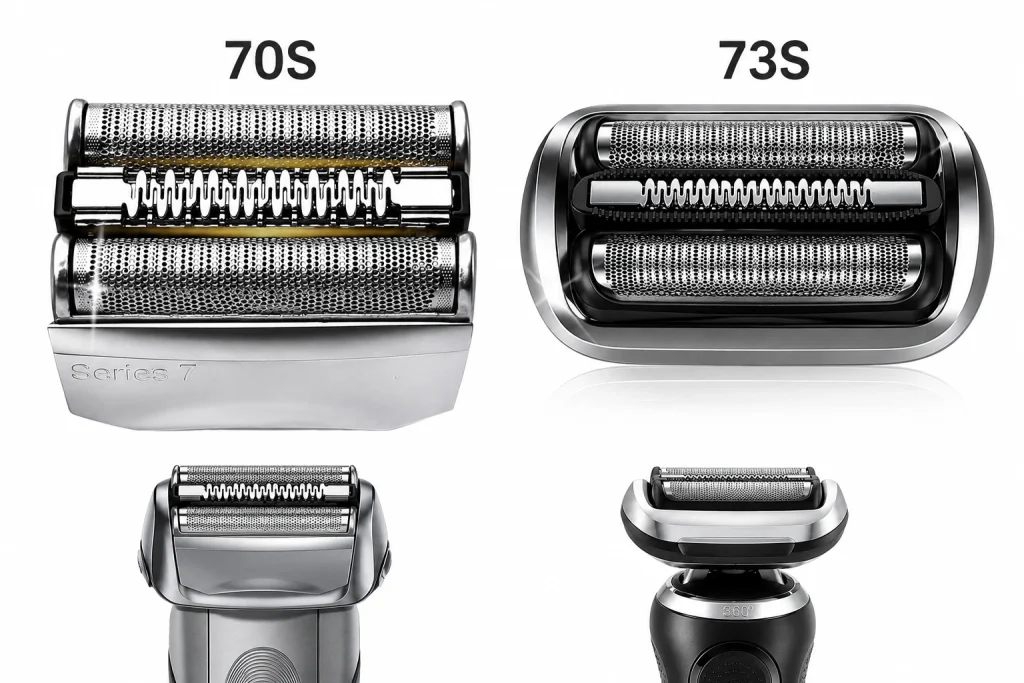
First: Do Not Force the Head
A Braun Series 7 cassette should seat evenly when it is the right head family for the shaver. You may need firm, even pressure, but you should not need to bend the foil frame, twist the cassette, or push hard enough that the shaver body flexes.
Stop and recheck the fit if:
- The head only attaches on one side.
- The cassette sits at an angle.
- The head pops off when you release pressure.
- The shaver makes a grinding sound after installation.
- The floating head no longer moves normally.
- The old head clicks on, but the new head does not.
Forcing the wrong cassette can damage the head mount, the new foil, or the shaver body.
Most Common Reasons a Series 7 Head Will Not Click On
| What you see | Likely cause | What to do |
|---|---|---|
| The new head shape looks different from the old one | Wrong Series 7 generation | Compare 70S vs 73S before trying again. |
| A 70S-style head will not fit a newer 360 Flex shaver | Wrong head family | Use the newer 73S or confirmed compatible head family instead. |
| A 73S-style head will not fit an older 790cc-style shaver | Wrong head family | Use the legacy 70S or 70B-style cassette family instead. |
| The head almost fits but will not sit flat | Alignment, debris, or slight obstruction | Remove it, clean the mount, and align both sides evenly. |
| One side clicks but the other side stays raised | Cassette is crooked or a latch is blocked | Remove and reinstall without twisting the head. |
| The old head clicks on but the new one does not | Wrong replacement, damaged new head, or manufacturing tolerance issue | Compare the connector tabs and contact support before using it. |
| No head clicks on anymore | Shaver head mount may be damaged | Inspect the release button, spring area, and mount before ordering another cassette. |
Check Whether You Bought 70S or 73S by Mistake
The words “Braun Series 7” are not enough to confirm fit. Braun has used the Series 7 name across older and newer shaver generations, and those generations do not all use the same replacement head.
Use this quick check:
| Your current or old head says | Likely head family | Important note |
|---|---|---|
| 70S | Legacy Series 7 70S family | Do not replace it with 73S unless your manual specifically confirms a different head system. |
| 70B | Legacy Series 7 70-series family | Often similar to 70S in family, but compare finish and listing details before buying. |
| 73S | Newer Series 7 360 Flex family | Do not replace it with 70S. |
| 74S | Newer Series 7 family in many cases | Confirm whether your exact shaver accepts 73S or needs 74S before ordering. |
| No visible number | Unknown | Check the manual, model label, old order, or compatibility guide before buying. |
If you are not sure which one you need, start with the Braun Series 7 cassette compatibility guide or compare Braun 70S vs 73S.
70S vs 73S Fit Symptoms
If You Put a 70S Head on a Newer Series 7 360 Flex Shaver
A 70S-style cassette is built for many older legacy Series 7 shavers. On a newer 360 Flex shaver, it may look close in width but fail to connect correctly. It may not lock, may sit too high, or may block normal head movement.
If your newer shaver model uses the 73S or 74S-style head system, use the correct newer head family. Start with the Braun 73S replacement head page if your old cassette or manual confirms 73S.
If You Put a 73S Head on an Older Legacy Series 7 Shaver
A 73S-style cassette is not the same as the older 70S-style cassette. On an older Series 7 shaver, such as many 720, 760, 790cc, 797cc, 799cc, 7840s, 7850cc, 7865cc, 7897cc, 7898cc, or 7899cc models, a 73S-style head may not click into the mount.
If your old cassette says 70S or your manual lists the 70S family, use a Braun 70S replacement head.
Step-by-Step Fit Check
1. Turn the Shaver Off
Make sure the shaver is powered off and disconnected from charging. Do not test a partly attached head while the shaver is running.
2. Remove the New Head
Take the new cassette off and inspect both sides. Look for bent tabs, a cracked frame, loose foil, or packaging material still attached.
3. Compare the Old and New Heads Side by Side
Do not compare only the width or color. Check:
- The printed cassette number.
- The side tabs or latch points.
- The bottom connector shape.
- The curve of the cassette frame.
- The way the head sits on the shaver mount.
If the underside or connector shape is different, the head is probably the wrong family.
4. Inspect the Shaver Mount
Use a small cleaning brush to remove hair, foil dust, or broken plastic around the head mount. Do not use sharp tools that can damage the latch area.
Check for:
- Hair packed near the latch.
- A broken piece from the old cassette.
- A stuck release button.
- A bent or uneven head mount.
- Cleaning residue that prevents the cassette from seating.
5. Align Both Sides Evenly
Place the cassette squarely on the mount. Press evenly instead of pushing one side first. If one side clicks and the other does not, remove the cassette and try again from a straight angle.
6. Stop If It Still Does Not Click
If it still will not click after confirming the head family, alignment, and mount cleanliness, do not keep forcing it. The issue may be the wrong replacement head, a defective cassette, or damage to the shaver head mount.
When It Is a Wrong-Part Problem
It is probably the wrong replacement head if:
- The old head and new head have different underside shapes.
- Your old cassette says 70S but the new head is 73S.
- Your old cassette says 73S or 74S but the new head is 70S.
- The product listing was chosen only because it said “Series 7.”
- The new head cannot sit flat even before you press it into place.
In that case, use the Braun Series 7 replacement head page to choose the correct 70S or 73S option, or use the 70S vs 73S comparison before ordering again.
When It Is an Installation Problem
It may be an installation issue if:
- The old and new cassettes have the same connector shape.
- The part number matches your old head or manual.
- The cassette almost seats but one side is slightly raised.
- The shaver mount has visible hair or debris.
- The release mechanism feels sticky but not broken.
In this case, clean the mount, align the cassette evenly, and follow the full how to replace a Braun Series 7 shaver head guide.
When It May Be Shaver Damage
The shaver body may be the problem if no cassette locks in anymore, including the old one. This can happen if the release mechanism is cracked, the head mount is bent, or a broken part from the old cassette is stuck inside the mount.
Warning signs include:
- The old head no longer locks either.
- The release button does not spring back.
- One side of the mount is visibly lower than the other.
- The head clicks on but immediately falls off.
- The shaver vibrates loudly with any head attached.
A new cassette cannot repair a damaged shaver mount. If the mount is broken, replacing another head may not solve the fit problem.
Quick Decision Guide
| Your situation | Best next step |
|---|---|
| Old cassette says 70S | Use the Braun 70S replacement head page. |
| Old cassette says 73S | Use the Braun 73S replacement head page. |
| You only know it is Series 7 | Use the Series 7 compatibility guide before buying. |
| You are choosing between 70S and 73S | Read Braun 70S vs 73S. |
| The head fits but pulls hair | Read the Braun Series 7 pulling hair fix guide. |
| You worry a compatible head could damage the shaver | Read do compatible heads damage Braun shavers. |
FAQ
Why won’t my Braun Series 7 replacement head click on?
The most common reason is that the replacement head belongs to the wrong Series 7 head family. Older Series 7 shavers often use 70S or 70B-style cassettes, while newer Series 7 360 Flex shavers often use 73S or 74S-style heads. It can also be caused by poor alignment, trapped debris, a stuck release button, or a damaged head mount.
Are Braun 70S and 73S interchangeable?
No. 70S and 73S are different Series 7 replacement-head families. They are not interchangeable unless your exact manual or verified compatibility source says otherwise.
Can I force the replacement head onto the shaver?
No. If the head will not sit flat or click with normal even pressure, remove it and recheck compatibility. Forcing a cassette can damage the head mount or the replacement head.
Why does one side click but the other side stays loose?
The cassette may be crooked, one latch may be blocked, or the replacement head may not match the shaver mount. Remove the head, clean the mount, and reinstall it evenly. If the same side still will not lock, inspect the shaver mount for damage.
What if my old head clicks on but the new one does not?
That usually points to a wrong replacement head, a defective new cassette, or a small fit difference at the connector. Compare the old and new underside shapes before using the new head.
Does a compatible replacement head need to click exactly like the old one?
It should sit securely and evenly. The feel may not be identical to the old cassette, but it should not wobble, fall off, bind, or require excessive force.
Where should I start if I bought the wrong Series 7 head?
Start with the main Braun Series 7 replacement head page, then confirm whether your shaver needs 70S or 73S before ordering again.