Quick Answer
The Braun 3040s can use either a 32B or 32S replacement cassette. They are the same compatible Series 3 foil-and-cutter format; 32B has a black frame and 32S has a silver frame. Choose the finish you prefer or the option that is available. There is no need to keep the same letter as the old cassette once you have confirmed that your shaver is a 32B/32S-compatible Braun Series 3 model.
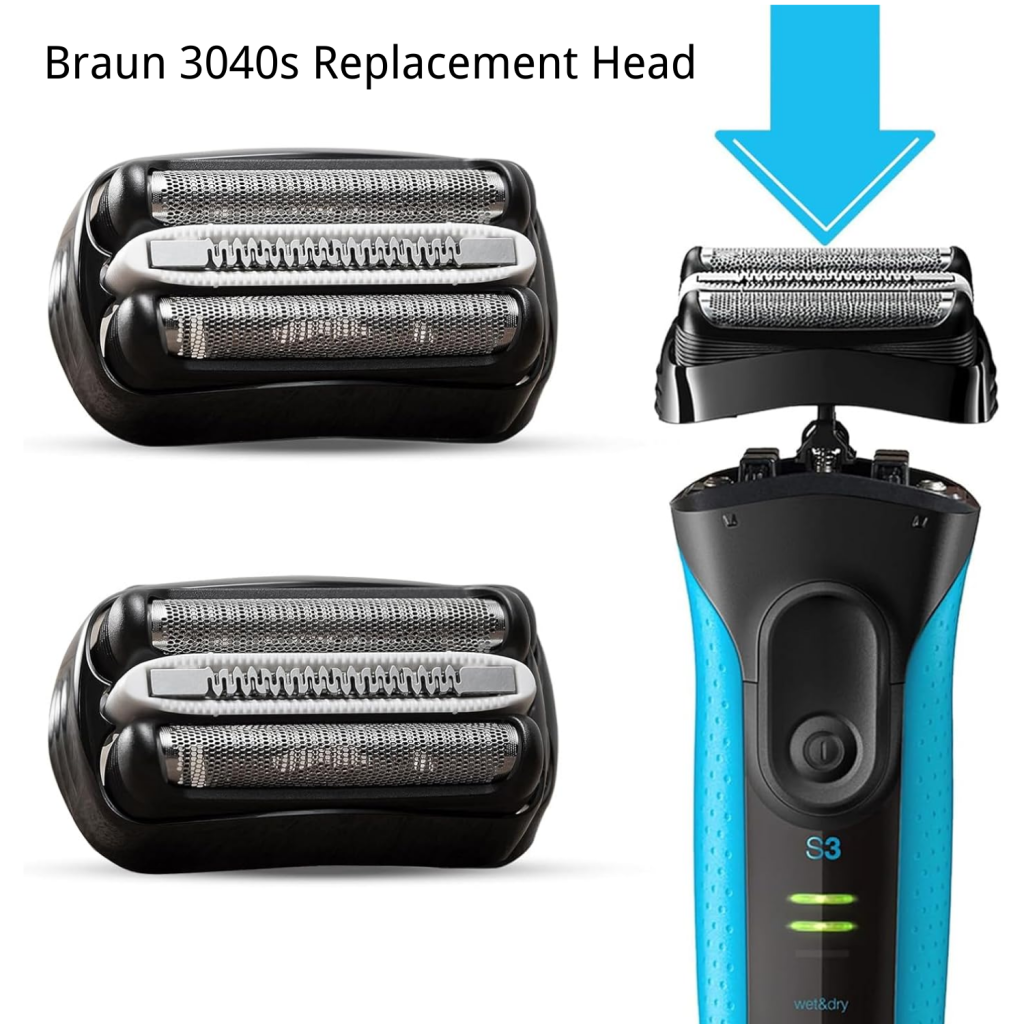
The 3040s uses a complete cassette rather than a foil-only insert. For a compatible replacement in either finish, see the Braun Series 3 replacement head product page and check the option, pack size, product disclosure and return terms before ordering.
Last updated: July 28, 2026 | Author: William | Estimated reading time: 6 minutes
Which Replacement Head Does the Braun 3040s Use?
Braun 3040s is a Series 3 ProSkin shaver. ShaverCheck’s Braun Series 3 overview places the 3040s in that ProSkin family and describes the current replacement as an integrated foil-and-cutter cassette. The foils and the internal cutter assembly are replaced together as one head. That is why a listing for a complete 32B or 32S cassette is the relevant product type for this model, while a foil-only part is not the same replacement.
Braun Series 3 cassettes are identified by a short part number on the frame or packaging. For the 3040s, the compatible choice confirmed for this guide is the 32B/32S family. The model name, not the color of a listing image, should be the starting point for the fit decision.
Does the Braun 3040s Fit 32B or 32S?
It fits both. The 32B and 32S suffixes identify the finish rather than two different 3040s connector patterns:
| Part number | Frame color | Use with Braun 3040s | Best choice |
|---|---|---|---|
| 32B | Black | Yes | Choose it for a black finish or when it is the available option. |
| 32S | Silver | Yes | Choose it for a silver finish or when it is the available option. |
Both options are complete foil-and-cutter cassettes for the same Series 3 replacement-head family. The practical difference for a 3040s owner is appearance and availability, not a different fit. For a closer look at the two suffixes, see the Braun 32B vs 32S comparison.
Do not extend this conclusion to every Braun shaver with a number beginning with 3. Series 3 revisions and regional model references can use different head families. The direct 32B/32S answer here is for the Braun 3040s.
32B vs 32S: What Is the Difference?
The visible difference is simple:
- 32B is the black cassette.
- 32S is the silver cassette.
For a confirmed Braun 3040s, either one can replace the other. Select 32B if you want the black frame, 32S if you want the silver frame, or whichever compatible option is in stock. The suffix does not indicate a different 3040s mounting system.
Check that the product is sold as a full cassette. A page that mentions only a replacement foil or only a cutter may not supply the complete assembly your 3040s needs.
How to Confirm Your Shaver Before Ordering
The 3040s marking is normally printed on the shaver body or rating label. Before checkout:
- Turn the shaver off and wipe the body so the model label is easy to read.
- Look for the complete model reference, including the
3040ssuffix, rather than relying only on “Braun Series 3.” - If the old cassette is still installed, remove it according to the shaver manual and look for a part number on the frame or packaging.
- Match the listing to a 32B or 32S complete cassette and confirm that the seller identifies the 3040s or the compatible Series 3 family.
- Check whether the offer is a compatible replacement or a genuine Braun part. Those are different product descriptions.
If the label is damaged or the old part number is missing, use the complete model reference and the seller’s compatibility information together. Do not choose a head solely because it is black, silver or described as “Series 3.”
How to Replace the Braun 3040s Cassette
The 3040s cassette is designed to be removed and replaced as a single unit. The exact release motion can vary by revision, so use the instructions supplied with your shaver when they differ from this general sequence:
- Switch the shaver off and unplug it if it is charging.
- Hold the sides of the old cassette and release it from the shaver body using the model’s release points.
- Keep the new 32B or 32S cassette straight above the connector. Do not force one side down first.
- Press evenly until the cassette is seated and clicks into place.
- Check that the head moves freely, then run the shaver briefly without pressing it into your skin. Stop if the cassette is loose, tilted or unusually noisy.
Do not disassemble the foil-and-cutter cassette while installing it. The complete unit is the replacement part; opening it can damage the foils or cutters before the first shave.
When Should You Replace a Braun 3040s Head?
Replace the cassette when the shaving result or the condition of the foils changes, for example:
- the shaver takes more passes to remove the same stubble;
- the foil feels rough, catches hair or becomes uncomfortable;
- a foil is visibly dented, cracked or perforated;
- the cutter makes a persistent scraping or rattling sound after cleaning and correct installation.
A damaged foil should not be used against the skin. Cleaning the head can remove hair and product buildup, but it cannot repair a torn or dented foil. Replace the complete cassette and inspect the connector if the new head does not seat correctly.
What If the New Head Does Not Fit?
First remove the cassette and check the model and part number again. A 32B and 32S should be interchangeable on a Braun 3040s, so resistance usually points to one of these issues:
- the listing is for a different Braun series or a foil-only component;
- the cassette is being pressed in at an angle;
- hair or debris is blocking the connector;
- the replacement is damaged or incorrectly labeled.
Never force the head into the shaver. Compare the old and new connector shapes, photograph the labels, and contact the seller before using the shaver if the cassette still will not click into place.
Braun 3040s Replacement Head Buying Checklist
Use this short check before placing an order:
| Check | What to look for |
|---|---|
| Model | The body or label says Braun 3040s. |
| Part family | The listing identifies a complete 32B or 32S cassette. |
| Finish | 32B is black; 32S is silver. |
| Product type | Foil and cutter are supplied together. |
| Seller disclosure | The listing clearly says whether the part is compatible or genuine Braun. |
| Order terms | Pack size, shipping and return conditions are visible before checkout. |
Once the 3040s fit is confirmed, the ShaversHead Series 3 replacement head page is the relevant purchase path for its compatible 32B and 32S options.
FAQ
Can I use 32S instead of 32B on a Braun 3040s?
Yes. A Braun 3040s can use either 32S or 32B. 32S has a silver frame and 32B has a black frame; choose by finish or availability.
Is the Braun 3040s replacement head a foil-only part?
No. The Series 3 replacement is normally an integrated foil-and-cutter cassette. Confirm that the listing includes the complete head, not just a foil insert.
Do I need the same letter as the old cassette?
No, provided the shaver is the Braun 3040s and the replacement is a compatible 32B/32S cassette. The two finishes are interchangeable for this model.
Are ShaversHead 32B and 32S heads genuine Braun parts?
ShaversHead products should be treated as compatible replacement heads unless a listing explicitly states otherwise. “Compatible” describes fit with the Braun 3040s; it does not mean the part was made by Braun.
Can I use a 21B head on the Braun 3040s?
Do not substitute 21B based only on the Series 3 name. This guide confirms the 3040s with the 32B/32S family. If a different part number is printed on your old cassette, confirm the exact model and part listing before ordering.