Quick Answer
Turn the Braun Series 7 shaver off and disconnect it from power. Release the old cassette, lift it straight off, and remove loose hair from the mount. Align the replacement cassette with the head holder, then press evenly on its rigid sides until it sits flat and secure. Stop if it needs force or one side remains raised.
Last updated: July 30, 2026 | Author: William | Estimated reading time: 5 minutes
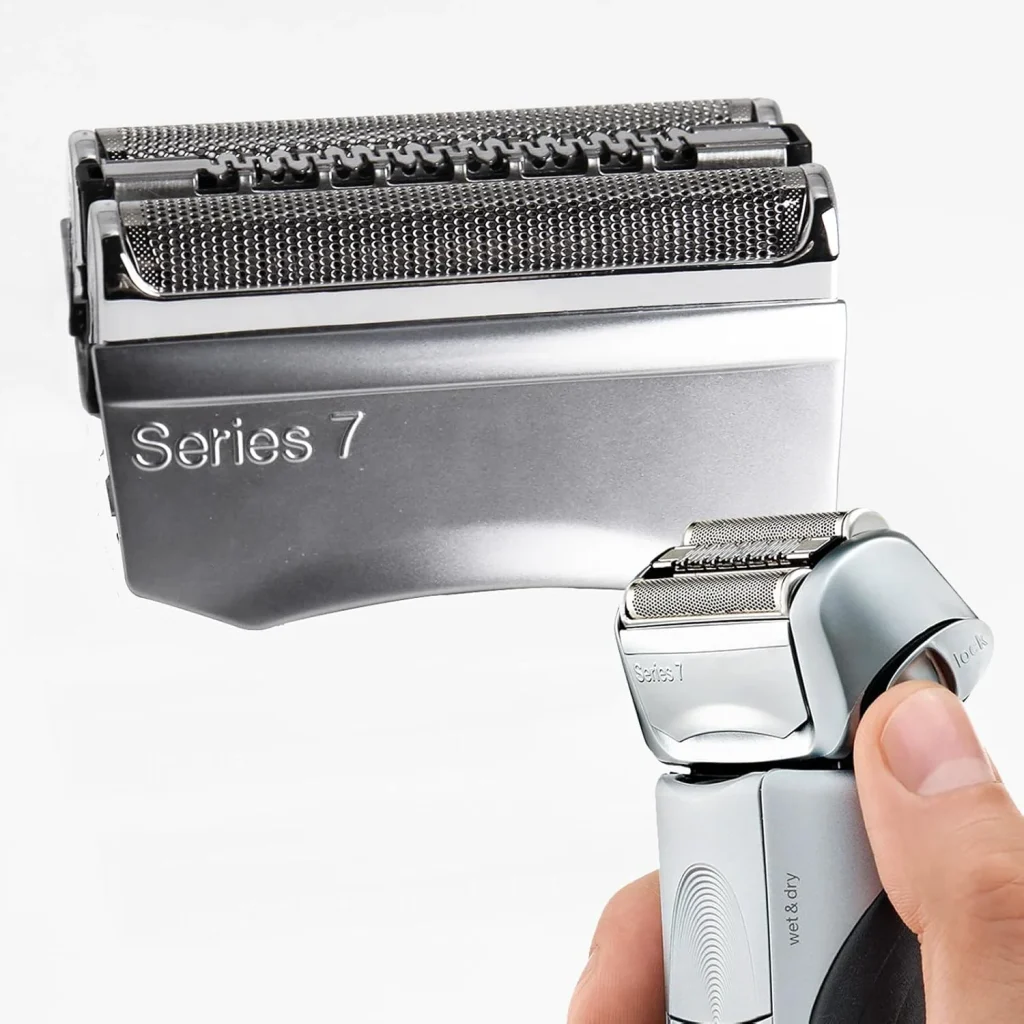

Before You Remove the Old Head
Braun has used the Series 7 name for shavers that take different cassette families. Check the code on the old cassette, the full shaver model, the manual, or a previous order before opening or installing the replacement. If you have not confirmed the part, use the Braun Series 7 cassette compatibility guide first.
Replace the complete removable cassette, not individual parts inside it. The cassette contains the foil-and-cutter assembly and should come off as one unit. You do not need a screwdriver or another tool for the normal cassette replacement described here.
How to Replace Braun Series 7 Shaver Head
1. Turn the Shaver Off
Switch the shaver off and disconnect the charging cable. Hold the handle firmly with the cassette facing upward. Work over a clear surface so the old head does not fall onto a hard floor.
2. Release and Lift Off the Old Cassette
Press the head-release control or controls on your Series 7 model. Lift the cassette straight away from the head mount. Hold it by the rigid outer sides rather than pulling on the foil.
If the cassette does not release normally, do not pry it off with a blade or screwdriver. Recheck that you are pressing the release control fully and consult the instructions for the exact shaver model.
3. Clear Hair From the Head Mount
Remove loose stubble from the exposed mount with a dry, soft cleaning brush. Check the latch points and moving supports for packed hair or debris that could keep the replacement cassette from sitting level.
Do not push a sharp object into the mount. If the shaver is damp from cleaning, let the mounting area dry before fitting the new cassette.
4. Align the Replacement Cassette
Compare the underside of the new cassette with the old one before installation. The connector layout and latch positions should correspond to the replacement family confirmed for the shaver.
Center the cassette over the mount and lower it evenly. Do not begin with one side hooked in at an angle, because that can leave the other side raised.
5. Press Evenly Until the Head Is Secure
Press on the rigid outer sides of the cassette, not on the foil screen. Apply even pressure until the head is seated. A correctly installed cassette should sit level, remain attached when lightly checked, and move with the head holder without binding.
Turn the shaver on briefly before placing it against your skin. Stop if the cassette rattles, scrapes, lifts on one side, or restricts the normal movement of the head.
Check the Installation Before Shaving
| What you see or feel | What it means | What to do |
|---|---|---|
| Cassette sits flat and both sides are secure | The head is seated normally | Run the shaver briefly and begin with light pressure |
| One side is higher or releases when touched | The cassette is not fully seated | Turn the shaver off, remove the head, and align it again |
| Hair or debris is visible around a latch point | The mount may be obstructed | Remove the cassette and clean the mount with a soft brush |
| New and old connector shapes do not correspond | The cassette family may be wrong | Stop and verify the old head code and exact shaver model |
| Installation requires strong pressure | This is not a normal fit | Do not force the cassette onto the shaver |
Once the correct cassette is installed, keep the old head code or a photo of its underside for the next replacement. If the removed cassette was worn or damaged and you have confirmed the correct family, compare the available Braun Series 7 replacement head options.
If the New Head Will Not Sit Flat or Click On
Remove the cassette and check three things: the exact replacement family, debris around the mount, and whether both sides are aligned at the same height. Try the installation again once, using even pressure on the rigid sides.
If the head still sits crooked, stays loose, or will not attach without force, stop. The Braun Series 7 replacement head fit and click guide separates wrong-part problems from alignment, obstruction, and possible mount damage.
FAQ
Do I need tools to replace a Braun Series 7 shaver head?
No tools are needed to replace the complete removable cassette. Use the shaver’s release control and the cassette’s snap-on mount. Do not use this procedure to disassemble the foil or cutters inside the cassette.
Is the cassette the same part as the Series 7 shaver head?
For this replacement procedure, yes. The removable Series 7 cassette contains the foil-and-cutter assembly and is commonly described as the shaver head, razor head, replacement blades, or foil head.
How do I know the new head is installed correctly?
It should sit level, remain secure on both sides, and move with the head holder without binding. When the shaver is switched on, the cassette should not lift, scrape, or produce an abnormal rattle.
Can I force a Series 7 replacement head into place?
No. Strong pressure can hide a wrong cassette family, poor alignment, debris in the mount, or damage to a latch. Remove the cassette and identify the cause instead of forcing it.
Does every Braun Series 7 use the same replacement cassette?
No. Series 7 shavers span more than one cassette family. Match the code on the old cassette or the exact shaver model before installation; do not choose a head from the Series 7 name alone.